Students Management
The Students Management module allows schools to maintain complete student records in a centralized system.
Using this module, administrators can:
- Add new students
- View student profiles
- Update student information
- Assign students to classes
- Manage parent information
- Store identity documents
- Track student records
This module serves as the primary student database for the school.
Quick view
- See student profiles at a glance
- Filter and search by class, section and status
- Manage admissions and student records
Best for
- Administrative staff
- Admission teams
- Class coordinators
Student List Overview
The Students page displays all registered students.
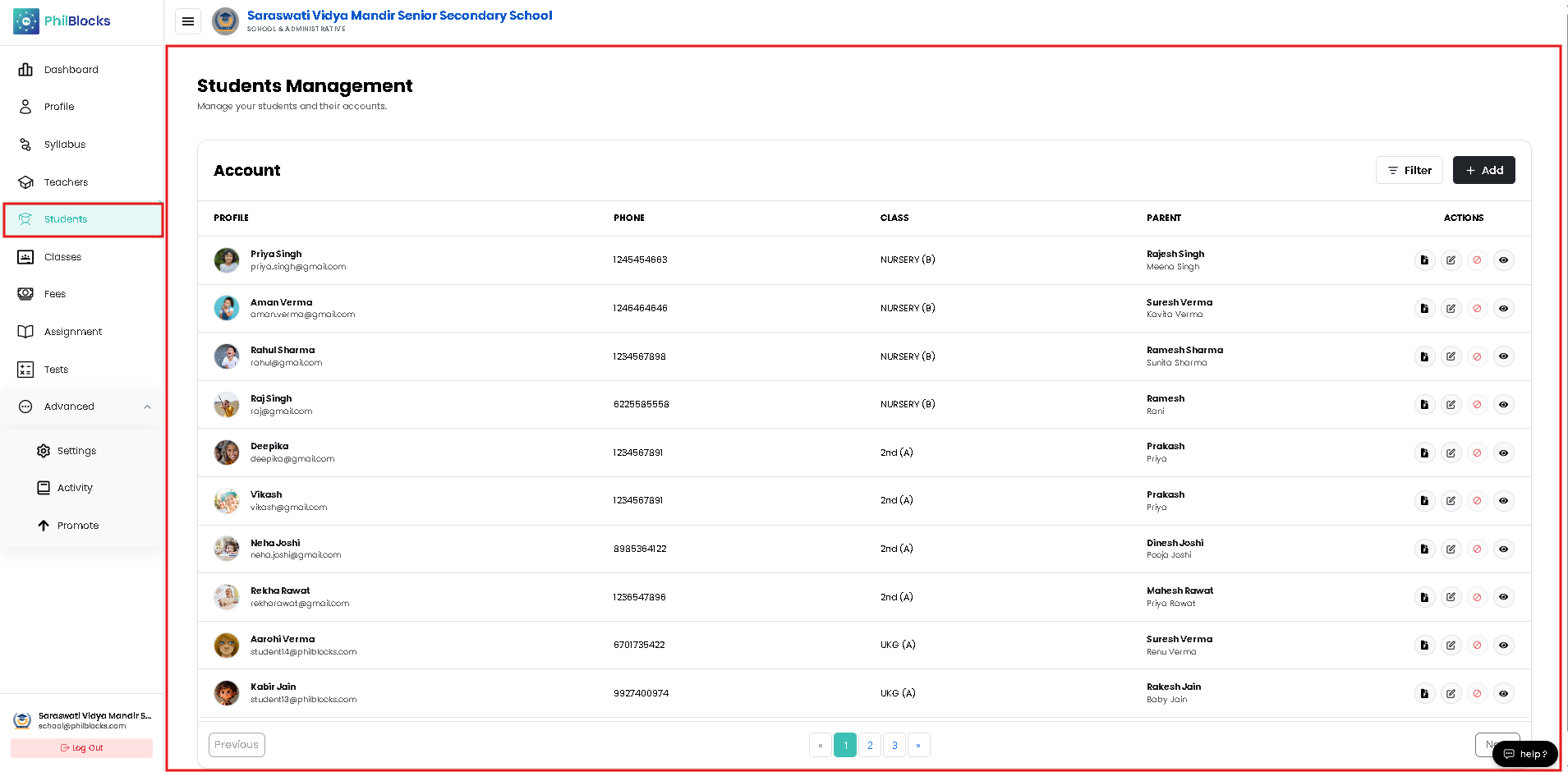 Each row contains key student information.
Information Displayed
| Field | Description |
|---|---|
| Profile | Student photo, name, and email |
| Phone | Student contact number |
| Class | Assigned class |
| Parent | Parent or guardian information |
| Actions | Available management actions |
Student Actions
Each student record includes several action buttons.
View Student
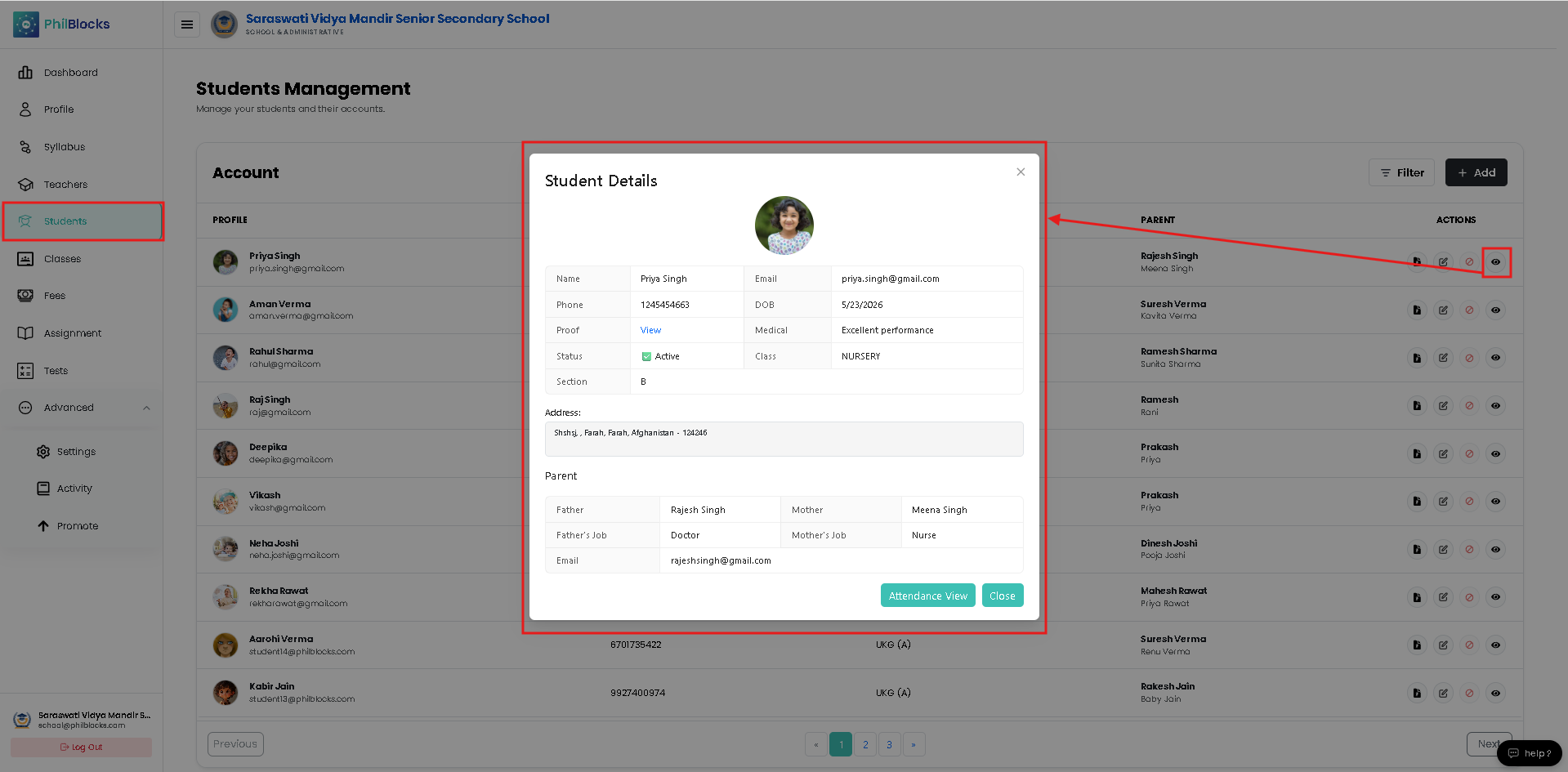
Displays complete student information.
Information includes:
- Personal details
- Contact information
- Parent details
- Class information
- Uploaded documents
Record Fees Student
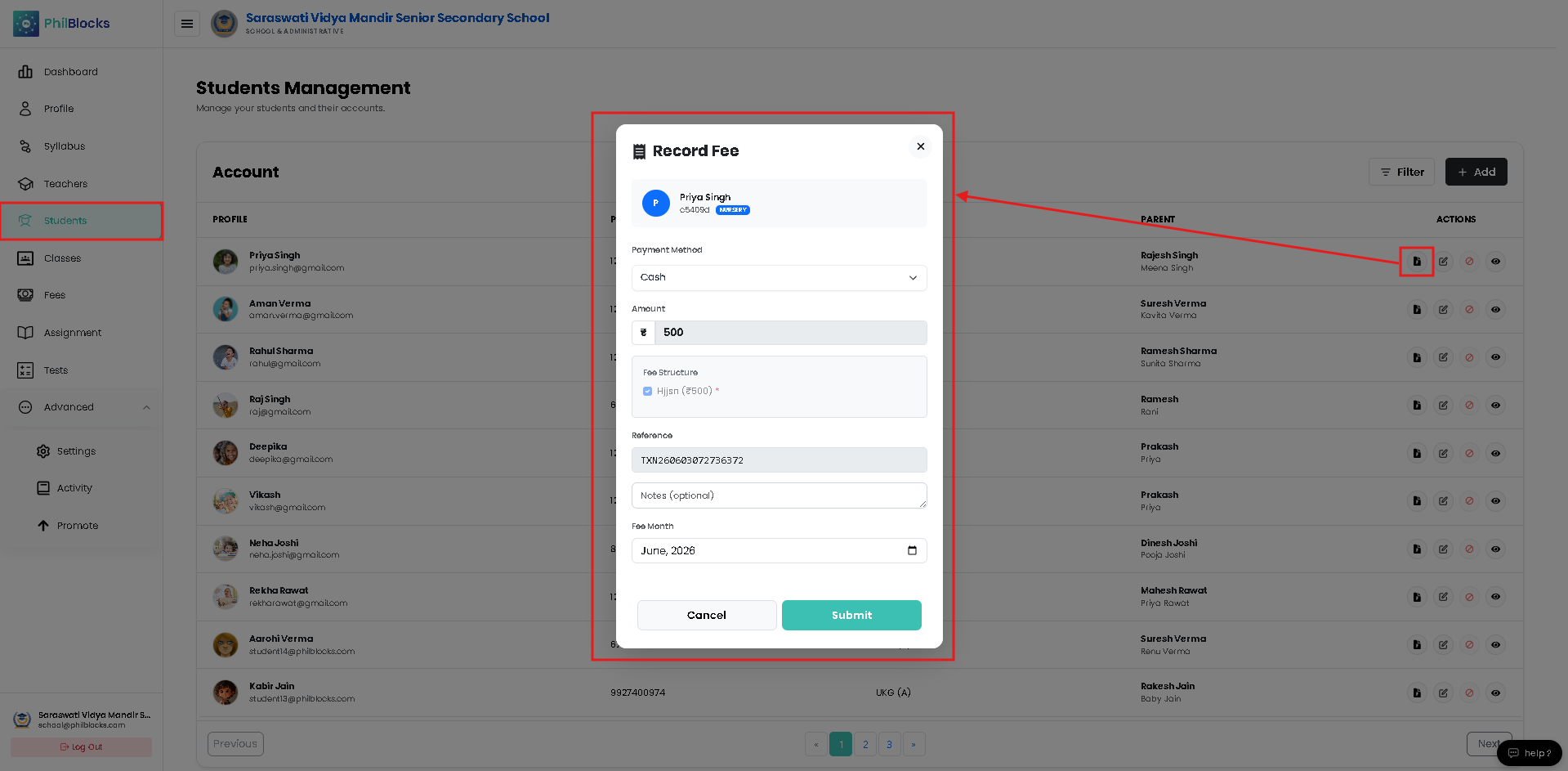
Edit Student
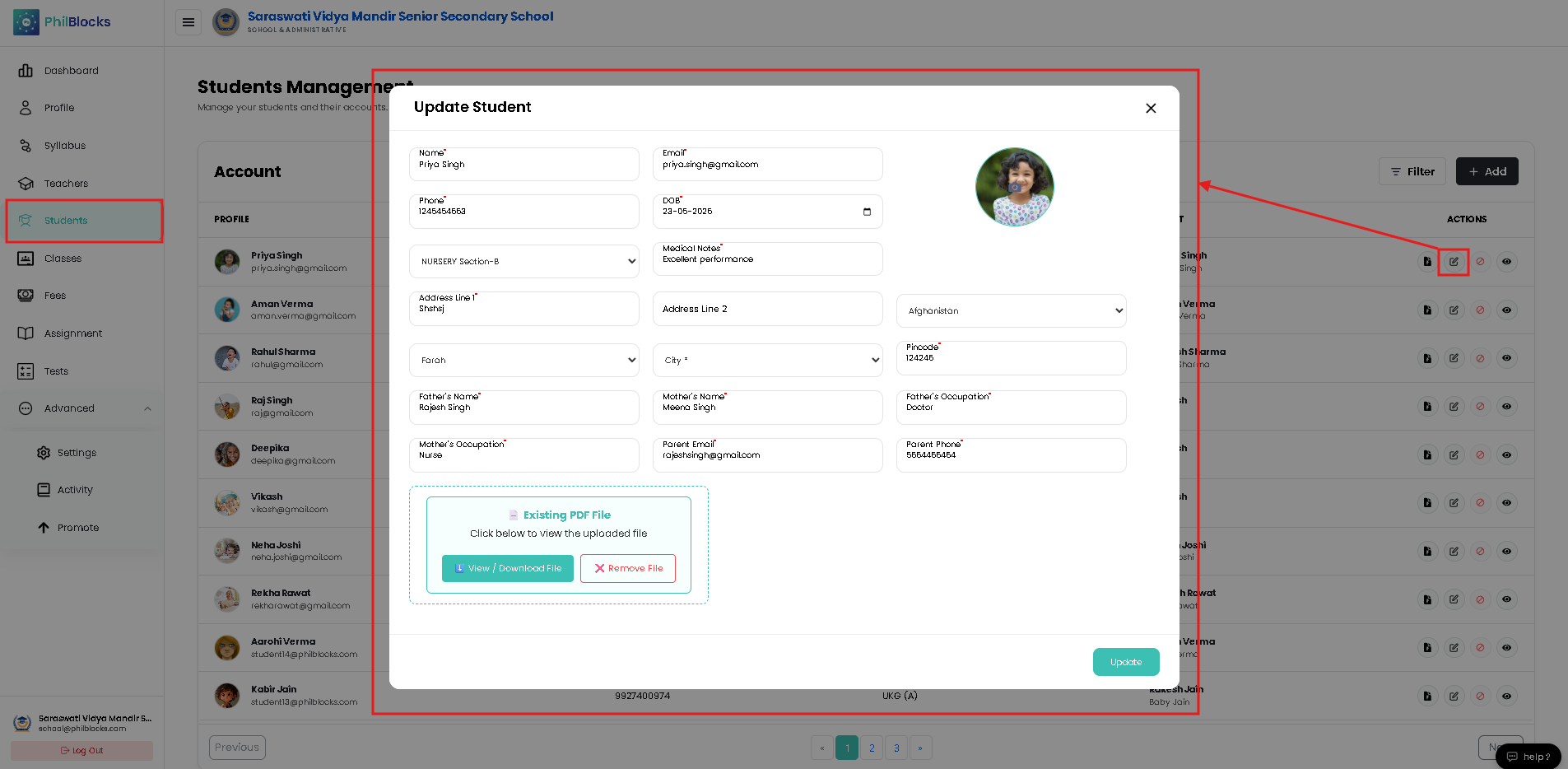
Update existing student information.
Examples:
- Name
- Phone number
- Address
- Parent details
- Class assignment
Disable Student
Temporarily deactivate student access.
Use when:
- Student leaves temporarily
- Admission is on hold
- Access needs restriction
Student Documents
View uploaded identity documents.
Examples:
- Aadhaar Card
- Admission Documents
- Verification Records
Filtering Students
Use the Filter button to quickly find students.
Common filters include:
- Class
- Section
- Status
- Admission Batch
Adding a New Student
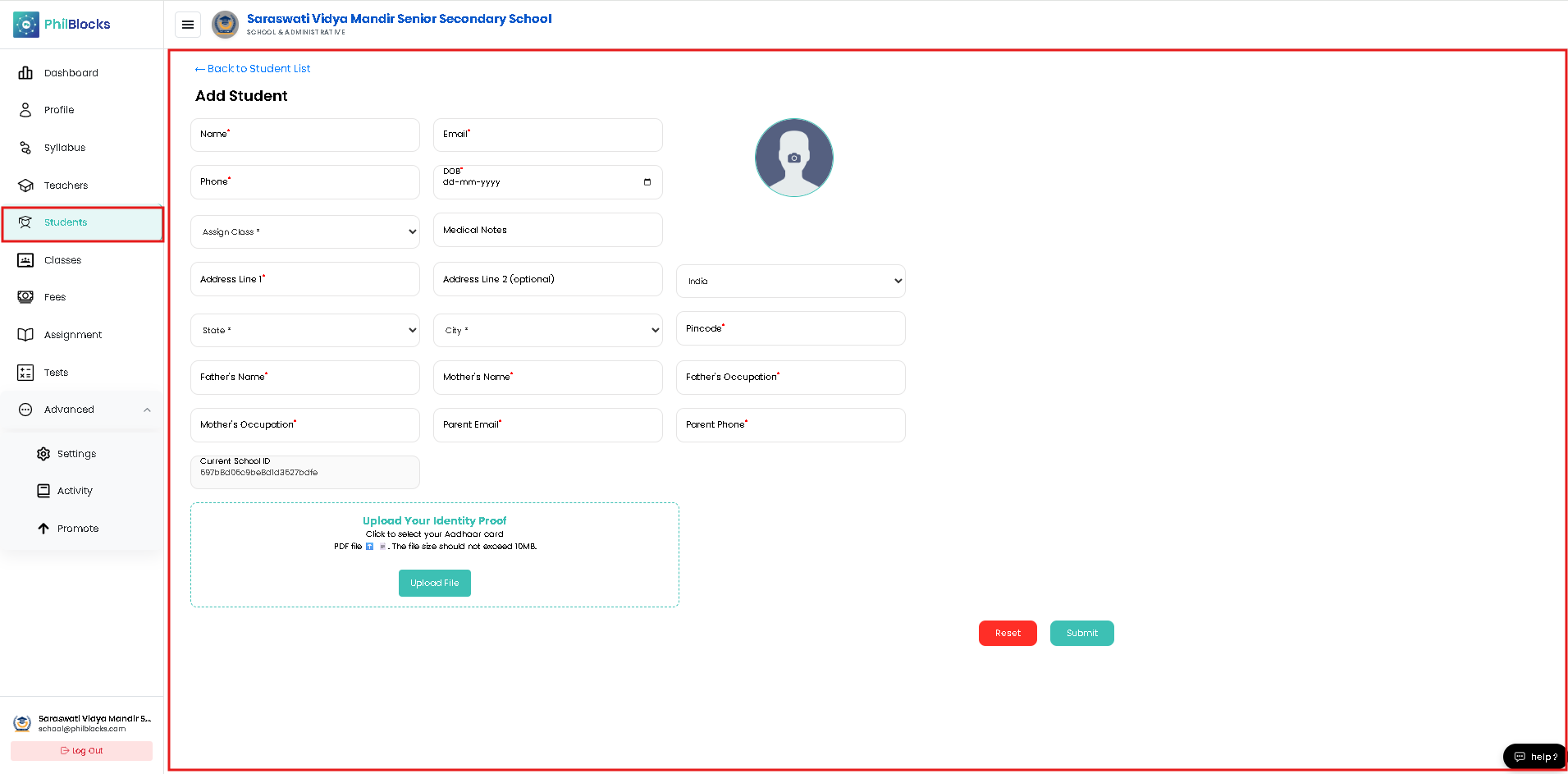 To register a student:
Step 1
Click the Add button.
The Add Student form will open.
Student Information Form
Complete all required fields marked with (*).
Basic Student Information
Student Name
Enter the student's full name.
Example:
Priya Singh
Student Email
Enter a valid email address.
Example:
priya.singh@gmail.com
Phone Number
Enter the student's contact number.
Example:
9876543210
Date of Birth (DOB)
Select the student's date of birth.
Example:
15-05-2018
Assign Class
Select the class for admission.
Examples:
- Nursery (A)
- Nursery (B)
- UKG
- Grade 1
- Grade 2
Medical Notes
Optional field used for medical information.
Examples:
- Allergies
- Asthma
- Special Medical Requirements
Leave blank if not applicable.
Student Photograph
Upload a recent student photograph.
Recommended:
- Passport-size photo
- Clear face visibility
- Recent photograph
This helps teachers and administrators identify students easily.
Address Information
Address Line 1
Enter the primary residential address.
Example:
House No. 25, Green Colony
Address Line 2 (Optional)
Additional address details.
Example:
Near City Hospital
Country
Select the country.
Example:
India
State
Select the state.
Example:
Uttar Pradesh
City
Select or enter the city.
Example:
Lucknow
Pincode
Enter the postal code.
Example:
226001
Parent & Guardian Information
Parent information is required for communication and emergency contact purposes.
Father's Name
Enter the father's full name.
Example:
Rajesh Singh
Mother's Name
Enter the mother's full name.
Example:
Meena Singh
Father's Occupation
Enter the father's occupation.
Example:
Business Owner
Mother's Occupation
Enter the mother's occupation.
Example:
Teacher
Parent Email
Enter the parent's email address.
Example:
parent@gmail.com
Parent Phone Number
Enter the parent's contact number.
Example:
9876543211
School Information
The form automatically displays the School ID associated with the current school.
Example:
697b8d06c9be8d1d3627bdfe
This field is generated automatically and normally does not require editing.
Identity Proof Upload
To complete student verification, upload an identity document.
Supported Document
Aadhaar Card (PDF)
Requirements:
- PDF format
- Maximum size: 10 MB
Upload Steps
Step 1
Click Upload File.
Step 2
Select the Aadhaar Card PDF.
Step 3
Wait for upload completion.
Step 4
Verify successful attachment.
Submitting the Form
After completing all required information:
Step 1
Review all details carefully.
Step 2
Verify parent contact information.
Step 3
Confirm class assignment.
Step 4
Click Submit.
The student record will be created successfully.
Managing Existing Students
Administrators can update student information at any time.
Common updates include:
- Contact details
- Address changes
- Parent information
- Class promotions
- Medical information
Best Practices
✅ Upload a recent student photograph
✅ Verify parent contact details
✅ Keep medical information updated
✅ Upload valid identity documents
✅ Review records before submission
✅ Ensure correct class assignment
✅ Update information after promotions
Frequently Asked Questions
Who can add students?
School administrators and authorized staff members.
Can student details be edited later?
Yes. Student records can be updated at any time.
Is a student photograph required?
It is strongly recommended for identification purposes.
Can parents be updated after admission?
Yes. Parent information can be modified whenever required.
What identity document is supported?
Currently, Aadhaar Card PDF files are supported.
Can students be moved to another class?
Yes. Administrators can update class assignments when necessary.
Related Documentation
- Dashboard Overview
- Profile Management
- Teachers Management
- Subjects & Syllabus Management
- Classes Management
- Fee Management
- Attendance Management
Student Registration Workflow
Create Student
      │
      ▼
Add Personal Information
      │
      ▼
Assign Class
      │
      ▼
Add Parent Details
      │
      ▼
Upload Identity Proof
      │
      ▼
Submit Student Record
      │
      ▼
Student Added Successfully