Profile Management
The Profile Management page helps schools keep their institution details organized, accurate, and easy to update.
This page is used by administrators to manage:
- School contact information
- Academic details
- Subscription status
- School facilities
- School images and branding
Key tasks
- Update school identity details
- Manage subscription and academic settings
- Upload school images and branding
Why it matters
- Keeps school data consistent
- Improves portal trust
- Supports accurate reporting
Page Sections
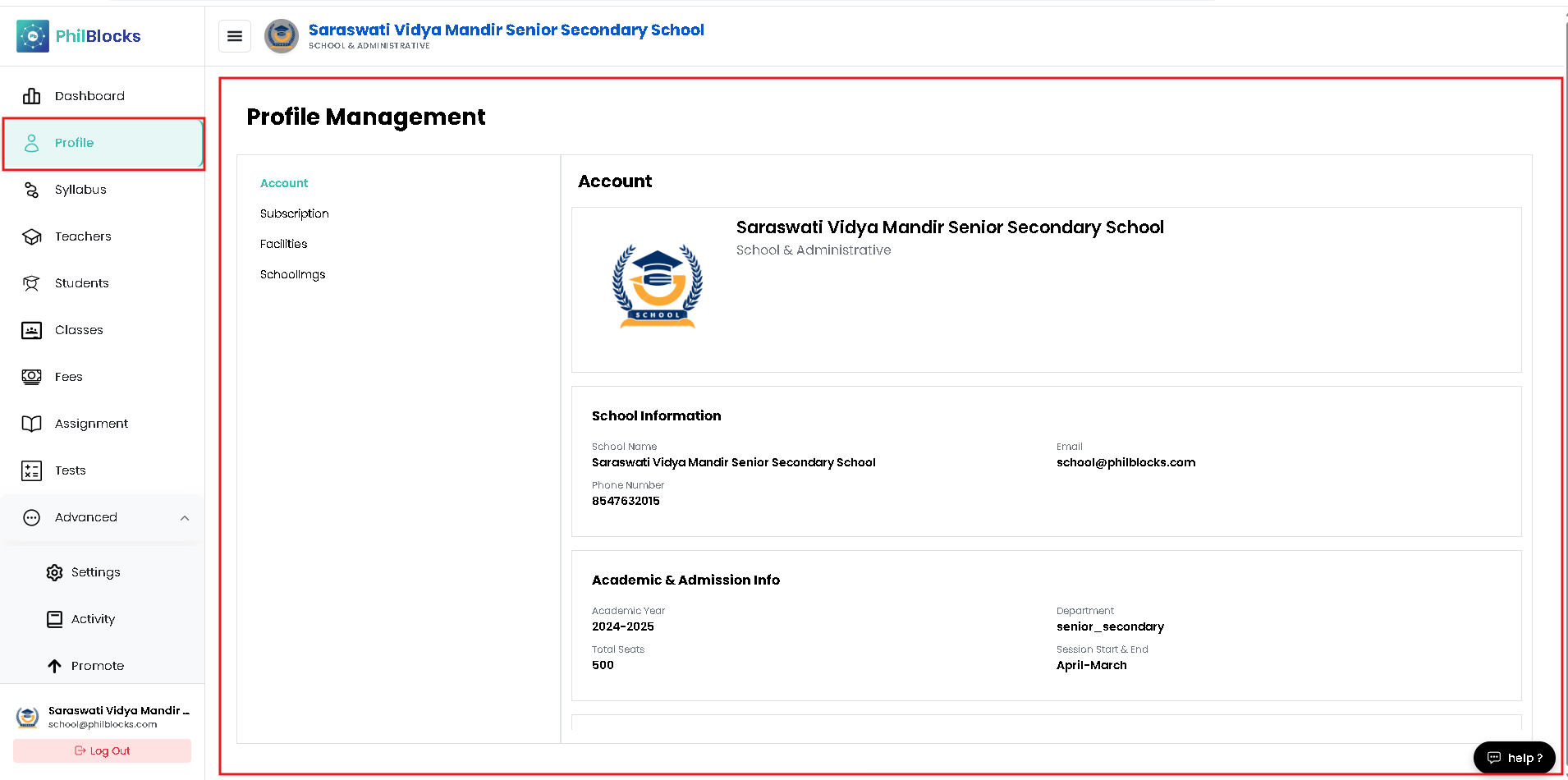
The Profile Management page is divided into clear sections that may appear on the left navigation menu:
- Account
- Subscription
- Facilities
- School Images
Each section is designed to make it easy to update key school data quickly.
Account Overview
The Account section is the primary place for school identity details and core contacts.
Key Details
- School logo and brand
- Official school name
- School type and category
- Contact email and phone number
- Address and location
Why it matters
These fields are used for all communication, reports, and branding throughout PhilBlocks.
School Information
Use this section to verify the school’s published details.
| Field | Description |
|---|---|
| School Name | Official registered school name |
| School communication email | |
| Phone Number | Primary contact number |
| Address | Campus location and address |
| Website | School website URL |
Example
| Field | Value |
|---|---|
| School Name | Saraswati Vidya Mandir Senior Secondary School |
| school@philblocks.com | |
| Phone Number | 8547632015 |
| Address | 23 Green Avenue, City Center, Uttar Pradesh |
| Website | https://www.philblocks.com |
Academic & Admission Details
This section contains the school’s academic session and admission-related settings.
| Field | Description |
|---|---|
| Academic Year | Current session name |
| Department | School category or board |
| Total Seats | Maximum student capacity |
| Session Start / End | Academic year range |
Example
| Field | Value |
|---|---|
| Academic Year | 2025-2026 |
| Department | Senior Secondary |
| Total Seats | 500 |
| Session Start / End | April 2025 - March 2026 |
Subscription Details
The Subscription section shows your current PhilBlocks plan and renewal status.
What you can see
- Current plan name
- Subscription status
- Next renewal date
- Included features
- Usage or limits
Why check this regularly
Keeping your subscription information current helps avoid service interruption and ensures your school can continue using all available features.
Facilities
The Facilities section highlights school resources and infrastructure.
Common facility entries include:
- Library
- Computer lab
- Science lab
- Sports ground
- Smart classrooms
- Transport services
Why facilities are important
Parents and staff use this information to understand the school environment and available amenities.
School Images
The School Images section is where schools upload photographs for their profile.
Suggested image categories:
- Campus and building photos
- Classrooms and labs
- Library and study areas
- Sports or playgrounds
- School events and activities
Use high-quality images to build trust and improve the school profile.
Profile Best Practices
- ✅ Keep school contact details up to date
- ✅ Verify academic session dates each year
- ✅ Review subscription status before renewal
- ✅ Keep facility listings accurate
- ✅ Upload recent high-quality school images
Profile Update Checklist
- Verify the school name and type
- Confirm contact email and phone number
- Check the academic year and session dates
- Review facility list and descriptions
- Upload current school images
- Save updates and confirm changes
Congratulations
You now know how to use the Profile Management page to maintain accurate school details, academic settings, subscription status, facilities, and images.